
Once gift cards are on, your customers can buy them from your booking site and use them to pay when they book. The online payment itself needs a payment service such as Stripe, which is why there are a few things to set up first.
What you need first
- Turn gift cards on. See Sell Gift Cards and Accept Them as Payment.
- Connect a payment integration such as Stripe, and make sure it's switched on. See Take Online Payments with Stripe.
Customers can buy a card as long as these two are in place. To let them spend a card when they book, your payment integration must also be set to Require payment when booking and take the full amount, not a deposit. This is the same rule that applies to online discount codes. It's needed because an online booking has no sale until you check the customer out, so whatever the gift card doesn't cover has to be paid there and then.
Go to More > Setup > Gift cards and the page tells you what is missing for each.
Let customers buy gift cards
- Go to More > Setup > Gift cards and tick Sell gift cards on your booking page, or go to More > Setup > Online shop and tick Gift cards.
- Select Save.
A Gift cards page now appears in the menu of your booking site. If you also sell packages or products online, it becomes a tab on your Shop page. See Set Up Your Online Shop.
What the customer does
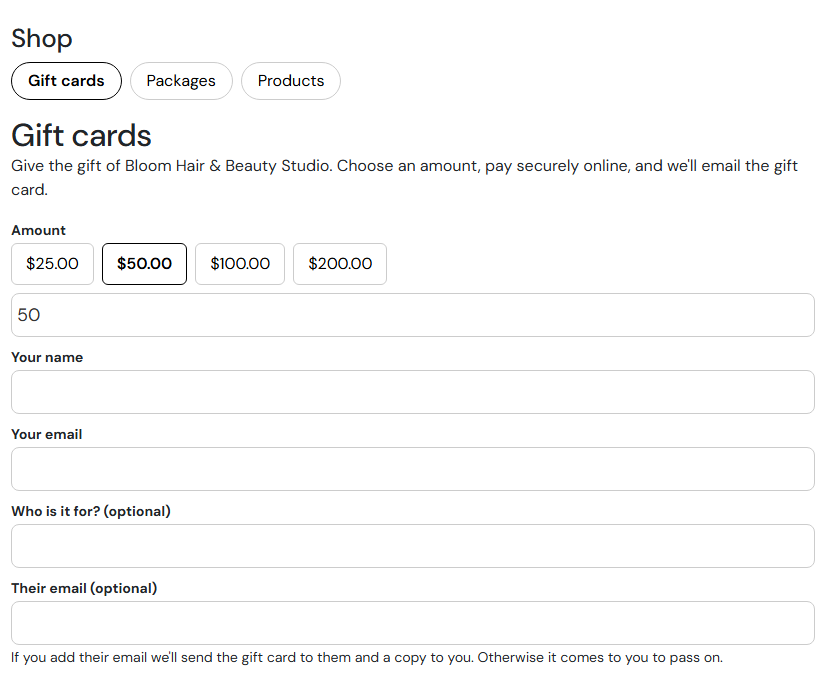
- Opens Gift cards from the menu.
- Chooses an amount (between 5 and 1,000) or types their own.
- Enters their name and email, and optionally who the gift is for, that person's email and a message.
- Pays securely on the payment page.
When the payment is confirmed, the page shows the gift card's code. The card is also emailed:
- If the customer gave the recipient's email, it goes to the recipient, with a copy to the buyer.
- If not, it goes to the buyer to pass on.
The email shows the code, the value, the expiry date if there is one and the buyer's message.
The card only exists once the payment has gone through. A customer who backs out of paying isn't charged and nothing is created.
Where the sale shows up
A gift card bought online is added to your Sales page as an invoice with a Gift card item, paid through your online payment method, just like one sold at the counter. It also appears in your list under More > Setup > Gift cards, where the buyer is shown.
Every sale belongs to a customer, so the buyer is added to your customers, using the email they gave. If that email already belongs to one of your customers, the sale goes on that customer. A new customer is marked as not wanting marketing emails or texts, so buying a gift card doesn't put anyone on your newsletter list. The sale is recorded against your first location.
Let customers spend a gift card when they book
On the last step of booking a service with a fixed price, a Gift card box appears when your payment integration meets the rule above.
- The customer enters the code and selects Apply.
- The page shows how much the card pays.
- If the card covers only part of the price, the rest is paid online. If it covers everything, the booking is confirmed straight away with nothing more to pay.
If the card can't be used, for example because it has expired or has no balance, the customer sees why.
Gift cards can't be used with services whose price isn't fixed, such as a "from" price or services with advanced pricing options.
When the money is taken from the card
The amount is set aside on the card when the customer books, so nobody else can spend it. It comes off the card's balance when you check the booking out.
- If the booking is cancelled for any reason before then, the money goes back on the card automatically.
- At checkout, the amount paid with the card is shown as already paid, like an online payment. You only collect what is left.
- You can't cancel a gift card while an upcoming booking is using it.
A customer can use a discount code and a gift card on the same booking. The discount comes off first.
Good to know
- Customers who book for courts or fields can use gift cards too. See Gift Cards for Court Bookings.
- If someone loses their code, find the card in your list by searching for the recipient or buyer, and give them the code again.
- A card keeps working across bookings until its balance runs out or it expires.